Kilobites by Sanico

a blog by humans, for humans.

We write opinionated articles on software, learning lessons from running our business, and personal reflections - Written by Sav Tripodi, Dom Tripodi, Bryan Susanto, and friends.

RSS Feed
Profile photo of Luke Librino

I Don’t Want to Write This Blog Post

There you have it, folks. I don’t want to write this blog post.

Is that too blunt? Too rude? Too… lazy?

Perhaps, it’s all of the above. But, what’s the one thing that it definitely is? Honest.

A round of applause for me. Just kidding, please don’t do that. Not yet, at least.

Let us track a little further back. Sav (The ‘Sa’ in Sanico) reached out to me and asked if I’d be interested in writing a reflective piece for their blog about some contract work I did for them, which included some IT Maintenance work, such as Hardware Installation - my fancy way of saying ‘I set up computers’.

I said ‘Well, gosh darn, diddly squat, cut me a block of cheese and slap it on a platter, because I’ll do it!’ (Liberties have been taken as to the correct response I had given Sav when he had asked… it was a couple months ago, okay?)

Simply, I agreed. I had initially expressed my desire to write a piece about ‘Management’, reflecting on my positive experience being managed by Sav and Domenico (the ‘nico’ in Sanico) during the contract, compared to some positive and negative experiences of being managed in other jobs throughout my life. These other jobs included:

  • Working as a kitchen hand for seven years
  • Editing both small and large format videos (videography and films)
  • Packing boxes of shoes at a warehouse
  • Bartending at multiple venues for large amounts of attendees
  • Working with sheep on various …

Keep Reading...

Profile photo of Sav Tripodi

How to Write a Blog Post: Guidelines for my clients and the general public

As a web developer I create blogs for many of my clients and constantly send out a list of guidelines to help them on their journey to successfully write blog posts. The guidelines consist of tips, advice, and criteria. In these guidelines I consolidated all of my learnings into a single referenceable source of information for myself, my clients, and the general public.

I sourced the tips, advice, and criteria from renowned sources such as the Google SEO team and my own expertise after 4 years of writing various blogs. I follow the same set of guidelines when I write my own blog posts.

Below I added a concise list of all of my guidelines with more in depth explanations further down the page:

The blog title: clear, concise, and descriptive

Want to know the best title to write so that your blog post receives the highest number of views? I’m sorry but the answer might provide little gratification… no perfect method exists. Countless people on the internet attempt to …

Keep Reading...

Profile photo of Sav Tripodi

Shopify Store Owners: Authenticate and Add a DMARC Policy to Your Domain

Shopify Store Owners: Authenticate and Add a DMARC Policy to Your Domain cover image

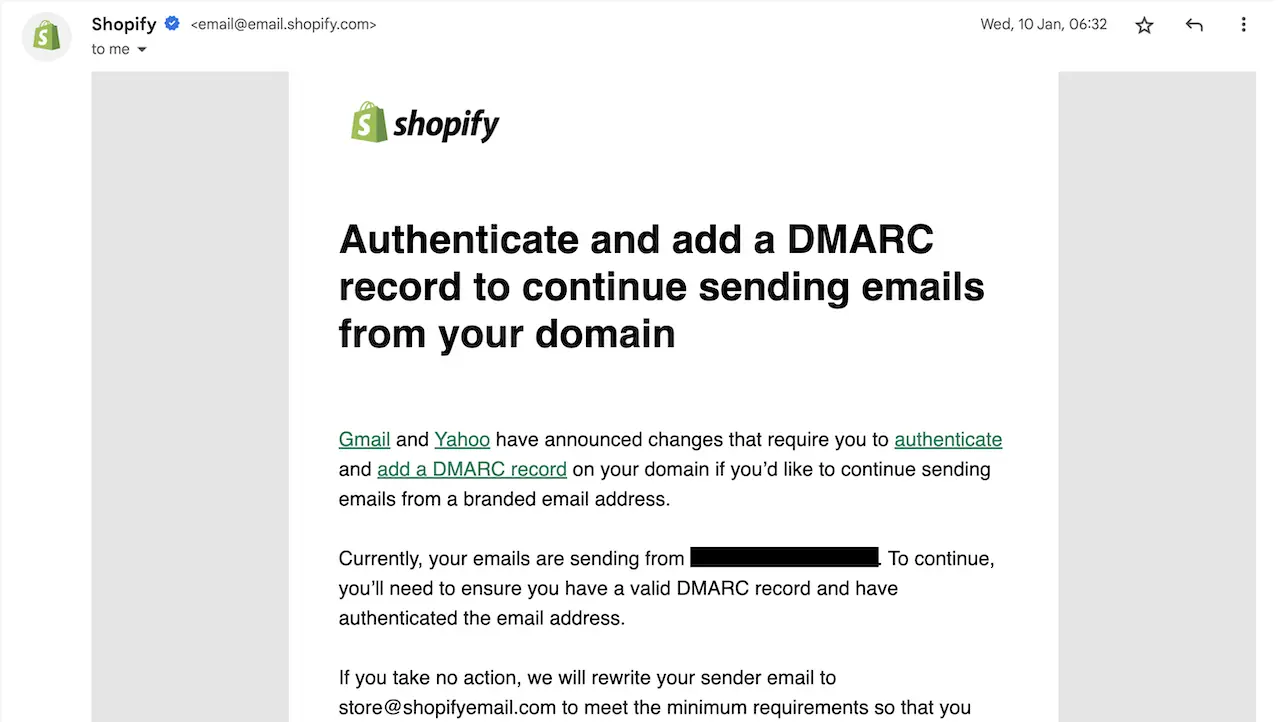
Since January 2024 Shopify sent out a flurry of emails to warn store owners to authenticate and add a DMARC record to continue sending branded emails from their domain, as per the screenshot cover picture of this blog post. I received an inundated amount of requests for help from my clients and people around the world from a reel on Instagram and YouTube that I posted.

Many Shopify store owners saw the warning but due to the technical barrier they failed to fix the problem themselves. I wrote this post to help explain the problem in more detail and discuss some paths to help resolve the problem.

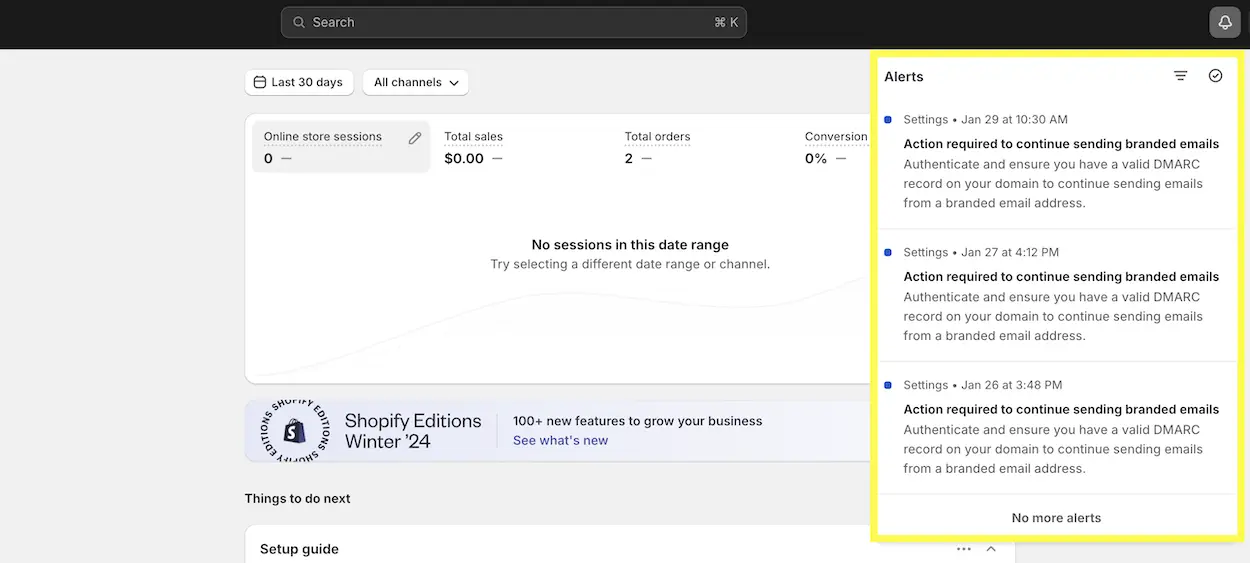
Shopify also sent out several notifications to store owners on their Shopify stores as seen in the screenshot below which stated “Action required to continue sending branded emails”. In this post I will explain DMARC, why you should authenticate to avoid being marked as spam, and link to Shopify’s documentation for those technical enough to fix the problem themselves.

Example of Shopify alerting a user of authentication and DMARC issues with their domain name.

Why has Shopify persistently warned all users about domain name authentication and DMARC policy?

In October 2023 Google and Yahoo, two of the biggest email service providers in the world, announced that to help fight against spam and fraud that they will require bulk email senders to authenticate their identity through an authentication technique called SPF, DKIM, and a policy called DMARC on their …

Keep Reading...

Profile photo of Sav Tripodi

Buttondown: A Founder Leading by Example with Superior Customer Service

I recently spoke to the founder of an innovative email service company called Buttondown Email. No, I don’t know the founder. No, this was not an interview for my blog. This was a sales enquiry. I contacted the sales staff as I required a custom premium feature and to my surprise the founder of the company, Justin Duke, responded to me. What the heck!!!!

This guy runs a decent sized technology company and personally responds to sales requests. It felt like the equivalent of me walking into a local McDonalds and being served a burger at the cash register by the CEO. Unheard of.

I discovered Buttondown Email on my search for a superior email service at a reasonable price. I wanted to ditch my previous newsletter provider Mailchimp because I find their product inferior and difficult to use. I even contacted the support staff of MailChimp recently with a problem and I received help from an overseas team that sent me around the merry-go-round. I wanted to get off that ride ASAP.

Boom! Buttondown showed up on my doorstep.

I came across it as I saw Basecamp, a product I use, said that they send email with Buttondown. I poked around and loved what I saw. A simplified product, built with privacy in mind, and easily extendible by a Software Engineer like myself. So many simple but powerful features tucked into a reasonably priced product. Please take my money.

So I went to sign up …

Keep Reading...

Profile photo of Sav Tripodi

Mobile First: Why should I design my website for mobile first?

Website Tip #10: Create a mobile first website.

To any business that reads this blog post I encourage you to stop reading, go view your own website on a mobile phone, and then come back to this post.

Alright, now answer the following questions:

  1. Did my website load fast on mobile? [yes/no]
  2. Did my website look good on mobile? [yes/no]
  3. Did my website work well on mobile? [yes/no]

If you answered no to at least one of the above questions then let me tell you 2 critical things:

  1. Around 60% of people use their mobile phones to view your website.
  2. As of October 2023 Google now discovers your website exclusively on mobile first.

If you built your website around 8 to 15 years ago you probably failed to consider mobile phones and rightfully so, the desktop computer reigned king of the internet.

Today the majority of people utilise mobile devices to browse the internet. Google noticed the rise back in 2015 and changed how they crawl websites for Google search. Only recently in October 2023 they announced they finally changed the default crawler to use the mobile first.

So, what the heck does that all mean?

In layman’s terms, Google discovers your website through its mobile version therefore if your website sucks on mobile then Google knows about it.

Not only that, if 60% of people globally use mobile phones to view your website, what impression do you think a customer will have of …

Keep Reading...

Profile photo of Sav Tripodi

How to add hidden fields in Tina CMS

For those who use TinaCMS I will show you how to add hidden fields to the metadata of your content files.

I utilise several default fields within the YAML of my content markdown files and I wanted to add them with TinaCMS when a user creates a new entry to a collection. After I read the well-written TinaCMS docs I noticed that no option existed to add default values and hide them from the user interface of TinaCMS.

I required these fields as they help me perform unique behaviour for specific types of collections such as the ability to disable the render of a content file. Whatever your reason to add default hidden values I will show you how I solved the problem.

To help illustrate the end result, I desired the fields in the code snippet below to ensure my static site generator skipped the rendering of a specific page without the end user in TinaCMS ever seeing this information:

---

_build:
  render: never

---

I will not explain the inner workings of TinaCMS, instead I will show you how to add default values to hidden fields in the steps seen below.

Step 1: Configuration of the project

You must install react and import it into your tina/config.* file otherwise you will run into errors when we will add JSX later in Step 3. The process to import JSX depends on the type of your config file, I created my TinaCMS config in pure JavaScript, therefore, I required a react import. For …

Keep Reading...

Profile photo of Sav Tripodi

The 4 most beautiful websites I've come across recently

I will show you 4 beautiful websites that recently caught my attention.

Every now and again as I surf the web I come across a few websites that make me say: “dammmnnnnn that’s nice”.

Just like a car enthusiast when they see a classic and rare car go past, as a web developer well-designed websites catch my eye.

Without any further ado, here are the 4 websites.

Disclaimer: I am not affiliated with any of the organisations mentioned, I earn no commissions, I added no affiliate link, and I am not endorsing any of the websites or their services. I like beautiful websites and that’s all.

Gumroad

Website: https://gumroad.com/ - Viewed on 07/11/2023

Screenshot of Gumroad home page. Gumroad homepage.

I found Gumroad because a client of mine wanted to create an online membership system with a tight budget. I found Gumroad and fell in love… with the design! Whoever led the design team for Gumroad created an excellent home page. It flows very nicely and really leaves an impression of how much effort the designers put into it.

Design choices I liked:

  • Parallax Scroll: Tasteful parallax scrolling that makes the page seem alive.
  • Contrast: Excellent contrasting with the colour scheme.
  • Tells a Story: As you scroll the page section by section it flows as if it tells a story of the company.

Unsplash

Website: https://unsplash.com/plus - Viewed on 07/11/2023

Screenshot of Unsplash plus home page. Unsplash Plus landing page.

I found Unsplash …

Keep Reading...

Profile photo of Sav Tripodi

One of the Most Unique Websites I Have Created: By Fabiano - SA Local Winemaker

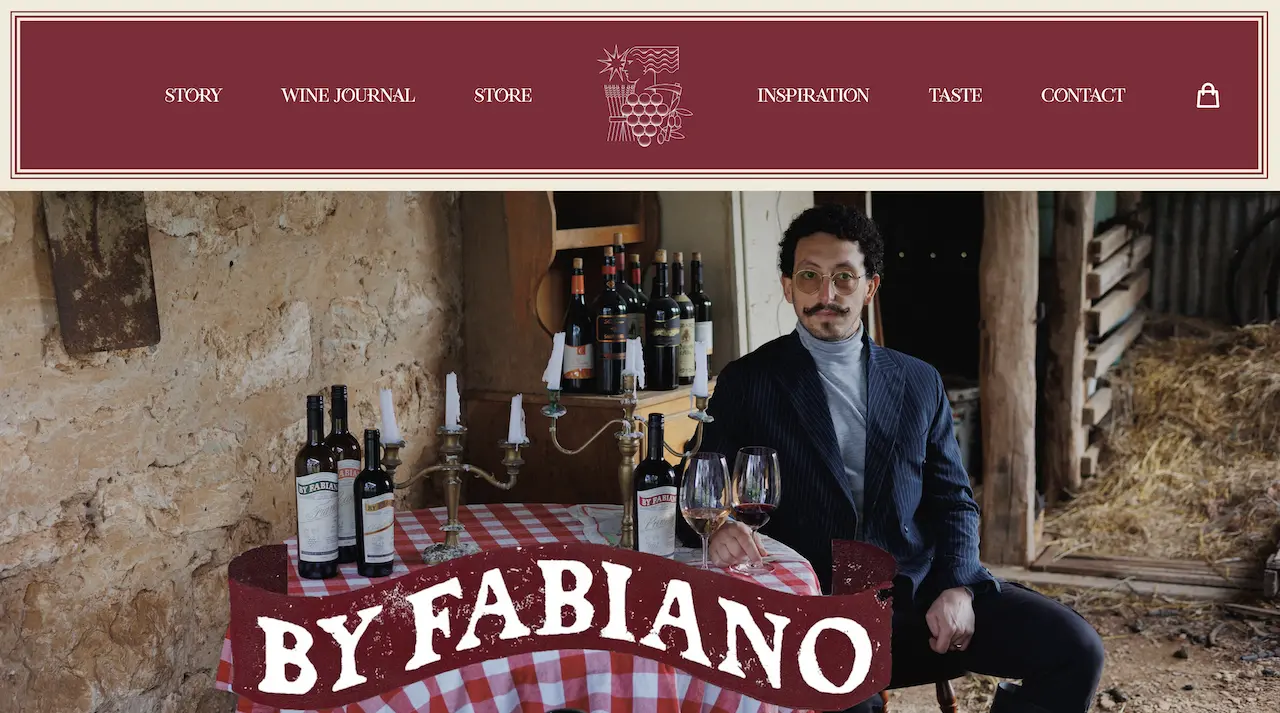
One of the Most Unique Websites I Have Created: By Fabiano - SA Local Winemaker cover image

My brother Dom and I created one of the most particular and unique websites for a local wine label called By Fabiano.

Fabiano, a local SA winemaker and his business partner Alex wanted to create a custom ecommerce storefront for their unique new wine label called By Fabiano.

Based in Mclaren Vale South Australia they produce a high quality wine with roots to their Italian heritage as described by this excerpt from their website:

“Working amidst a distinctive terroir, including ancient soils, Fabiano’s range is deeply rooted in his Italian heritage, with the aim to inspire a legacy within the McLaren Vale region. This merger between wine cultures ultimately becomes a new tradition with the goal of handing it over to future generations. It is not the fruit that is to be adapted to his style, but rather his style that adapts to the fruit’s expression.”

Alex from By Fabiano reached out to us from a recommendation and explained his plans for the website. As a local South Aussie I felt quite excited to bring this project to life. We came to an agreement to create the website and immediately broke ground on the new project.

Every client I work with possesses a different set of requirements they desire for their website. Some clients provide me with a list of websites they want me to use as inspiration, some give me a logo with a variety of pictures and leave …

Keep Reading...

Profile photo of Sav Tripodi

The Fake SEO Salesman: A Warning to Other Small Businesses

Once upon a time a fake, cunning, and wretched SEO salesman approached one of my clients. He ran a questionable report, with a questionable analysis, and with a questionable video of him explaining SEO concepts.

My client signed up for $500 a month for this service as she honestly wanted to improve her website. This bloke charmed her with his magic and promised her the thing everyone wants but can’t have without payment, a spot at the top of Google. Oh yes, he promised.

After several months of paying she questioned the legitimacy of his services. The website went down suddenly and her clients complained. She reached out to the SEO magician and he appeased her worries: “No problem I will fix it ASAP, all good”. My client waited and waited, and… waited some more. Then suddenly, after all this time waiting, he still did… wait for it… absolutely nothing.

My client began to question the authenticity of his services especially because the SEO salesman stopped responding as quick once he received his handsome monthly payments, funny that. Then my client bumped into a friend of mine that recommended our website services. She reached out to us and explained the issues.

After we spoke with her we searched up her website and by golly it looked like frankenstein. She went through so many so-called web developers that put bandaids on top of bandaids, temporary fixes that …

Keep Reading...

Profile photo of Sav Tripodi

We Transferred 496 Products from Wix to Shopify

We Transferred 496 Products from Wix to Shopify cover image

I wrote a program to transfer 496 ecommerce products from Wix to Shopify.

We performed this transfer for Rachel, the owner and operator of Essence & Soul on King William Road in Adelaide, South Australia.

She previously utilised a Wix store to sell her catalogue of over 496 products but we recommended she move to Shopify as we flat out refuse to build ecommerce stores using Wix due to its inferiority.

Therefore, on our recommendation she required a full transfer to the new Shopify powered store that we built for her.

Screeeeeech, pull the brakes.

One big problem: to upload 496 products by hand would consume a significant amount of time and Wix provides no native way to automatically transfer to another vendor.

Luckily this was not our first rodeo to automatically transfer a significant amount of products, we previously transferred around 30-50 products for another client of ours called Portrush Flowers. However, it consisted of a transfer between WooCommerce and Shopify, not Wix.

We built a custom program to transfer the products for Portrush Flowers to help automate the majority of the transfer. I say “automate the majority” because very few systems perform a perfect transfer, I will explain why later.

WooCommerce made it easy enough to use their API to transfer products to Shopify. However, Wix is notoriously difficult to transfer away from, they love to keep you as a …

Keep Reading...

Subscribe for future posts by Sav, Dom, Bryan and friends. This is a once-a-month blog wrap-up only.