
More links means higher Google rankings... right?

Well, it’s a little more complicated than that.
Reputation and external links
One new insight I got while reading Google’s SEO Docs was how external links on your website could affect how Google perceives your website since it could cause Google to associate the linked website with your website. It could affect it in a good way when you are e.g. citing trustworthy sources like I just did, however it could also negatively affect it if those linked websites are a bit shady.
For example, when I was recently writing a blog post on creating a Black Friday banner in Shopify, I considered putting an external link to an online countdown timer that I used to check whether my countdown implementation across timezones worked properly. However, I realised that this random online countdown timer may not be the most trustworthy site to include with its large number of ads on the page. So I decided to exclude this link from the blog post and instead just included a screenshot of me comparing my countdown to that online countdown, which still conveyed the message just fine.
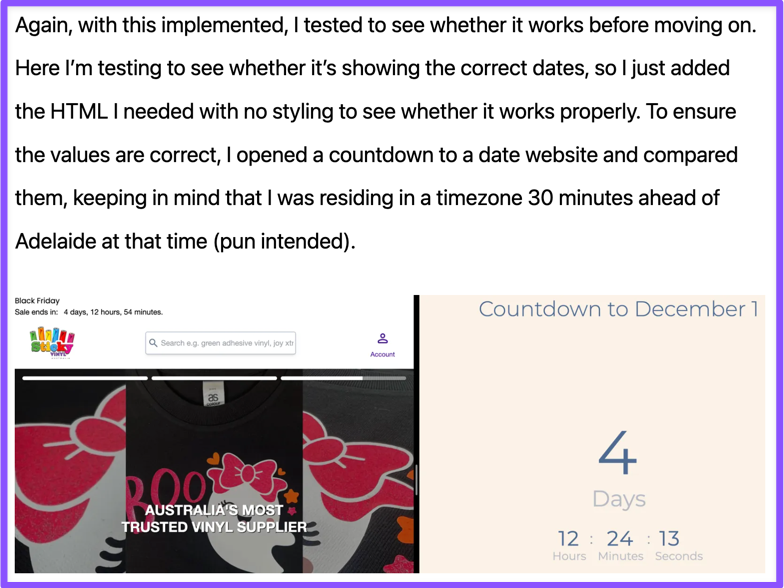
But what about when you still want to include a link to an external website because a user might find it helpful? For example in the previous scenario, I might still had wanted to include a link to that particular online countdown timer to save my readers some time from having to look one up. Or perhaps you’re writing a technical blog post that links to some random sketchy website that helped you solve an arcane bug. Well in this case, you can use the rel attribute with a value of nofollow to tell Google that you don’t want its crawlers to follow this link and influence your site’s reputation with it.
<!-- Example using rel="nofollow" -->
<p>
	Out of all places, I found the solution to the bug in a random <a rel="nofollow" href="https://random-forum.com">forum thread</a> from two decades ago with people trying to solve a completely unrelated problem.
</p>
Note that this reputation stuff also still applies to user-generated content, such as product reviews and blog post comments. To prevent links in user-generated content from affecting Google’s perception of your website, you could use the ugc value alongside the nofollow value on the rel attribute of your links. Indeed, these values can be used together in one rel attribute by separating them with a space.
<!-- Example using rel="nofollow ugc" -->
<h3>User review</h3>
<p>
	This product is low quality!! Check out <a rel="nofollow ugc" href="https://competitor-x/product1">this product by Competitor X</a> instead.
</p>
And lastly, if you are including links to external websites because someone sponsored you, you must include the value of sponsored inside of your rel attribute, to be transparent to Google about why you are putting this link.
<p>This blog post is brought to you by <a rel="sponsored" href="https://this-is-a-joke.com">Raid Shadow Legends</a>!</p>
If you would like to read about using the rel attribute from Google themselves, check out their article on qualifying external links.
So just add as many trustworthy links as possible?
“Now”, you might think, “if adding links to trustworthy sources could improve Google’s perception of my website, I should do linkmaxxing on my website then!” Well, turns out this could actually cause your website to rank lower in search results or be removed from search results completely. This is because Google considers this “link spam”, which is “the practice of creating links to or from a site primarily for the purpose of manipulating search rankings” (see Google’s documentation on their scam policies).
A better approach is to only add what would be useful for potential readers. For example, readers of this blog might find the link (that I included earlier) to the Google SEO Docs helpful if they are curious to learn more about SEO. Or when I’m writing on a technical topic in a blog post, I often include links to the technologies and technical terms I’m using. For example, again, in the blog post on creating a Black Friday banner in Shopify, I linked the term “Stimulus JS” to the Stimulus JS home page, and the terms “values” and “controller” to the corresponding pages in the Stimulus JS reference.
By including reputable links with the primary goal of helping readers, you not only create a better experience for readers but also helping build your site’s reputation without Google marking you as spam. Just be weary though since over-linked content can be very annoying to read.
How to include links on your website
Well, although this might seem obvious as I’ve already included a couple of link examples before this, there are several caveats to watch out for.
First of all if it’s with text, you should use anchor tags <a> with a valid href attribute to create links, just as I had been using throughout this blog post. Otherwise, Google crawlers might not be able to follow them. For example, you should not put a href attribute on a <div> element, nor should you use another attribute that is not the href attribute to store the link, for example. This is what we do on the Sanico website, for example when linking to our Google Reviews and Trustpilot pages.
<p class="prose">We worked with 100s of small and mid-sized businesses around Australia and the world, see for yourself what they’ve publicly said about us on <a href="https://maps.app.goo.gl/CFQqbma94kNG2mZx9">Google Reviews</a> and <a href="https://au.trustpilot.com/review/sanico.com.au">TrustPilot</a>.</p>
Some might put links inside of non-href attributes with the intention to trigger those links using JS or some framework because it is required for it to function properly. To ensure that crawlers are still able to follow them, you should include a href attribute with the same link.
<a href="https://sanico.com.au" onclick="someFrameworkLinkFunction('sanico.com.au')">Sanico Software website</a>
The anchor text (the text between the <a></a> tags) must also be descriptive of what the link is, which should make sense even when it is read on its own without the surrounding context. Just don’t make them too long though. For example, notice how all of the links I’ve included in this article include anchor text that fit this criteria.
Now if you are using an image or SVG as a link, you should enclose them inside of an anchor tag <a> with a href attribute, and somehow provide an accessible text description of it. There are two main ways of doing this, which is either to include the anchor text in the title attribute of the anchor tag, or preferably as alt text in the img tag. For SVGs, its equivalent for alt text is its own <title> tag within the <svg> element. For example on Luciano Concrete, we had a section including logos of who they’ve worked for. Some of these are SVGs, others are images, but all are wrapped in <a> tags with a valid href attribute, and the anchor text is included in the <title> tag inside the <svg> tag or alt attribute of the <img> tag respectively.

<!-- SVG example -->
<a href="https://www.metricon.com.au/" class="...">
	<svg class="..." ...>
		<title>Metricon Australia Logo</title>
		...
	</svg>
</a>
<!-- Image example -->
<a href="https://www.orsr.sa.gov.au/places-and-spaces/our-venues/sa-athletics-stadium" class="...">
	<img alt="SA Athletics logo" loading="lazy" src="/images/businesses-worked-with/sa-athletics-logo.webp" class="..." ...>
</a>
If you would like to learn more about creating links the proper way on your website, check out Google’s documentation on link best practices.
Concluding remarks
In conclusion, more links does not necessarily mean higher rankings; you must ensure that they are good and reputable links, that you do not overuse them but instead aim to be useful to visitors, and that you include them properly technically through anchor tags <a> with valid href attributes and good anchor text.
As I’ve said in my previous blog post, the focus of SEO has shifted to high quality and helpful content as well as good user experience over specific techniques to “rank higher”, because in the end that’s what search engines are all about: serving the user what they need through ranking them the highest. Previous mechanisms like keywords were supposed to help search engines reach this goal, however as Goodhart’s law predicts (“when a measure becomes a target, it ceases to be a good measure”), people keyword-stuffed and this failed to be an accurate indicator of content relevance and quality.
So, when doing SEO, although you should keep the system in mind like to create links in the proper way and the reputation of the sites you’re linking to, always remember that you’re doing this for the benefit of your website visitors.
This is post #1 of the “SEO For All” blog series.