
Apr 9, 2026
Cross-browser user permissions in Phoenix LiveView
You know those times when you’re on this rollercoaster of emotions when debugging something, thinking that you’ve solved it but then another problem comes up? Yeah, this was one of those times.
Context was, I was working on a Phoenix LiveView app called BESTguestbookEVER for one of our clients. It’s an upcoming custom web app for a new startup based in Adelaide, where wedding guests record a video message instead of writing in a traditional guestbook. If you’ve read my previous blog post you would know the story, but a summarised version is that I was working on the video recording feature which required obtaining video and audio permissions. Unfortunately, it wasn’t as simple as just asking for the permissions and the user granting it through browser prompts. There were some additional things I had to do to get it working.
The big part of it was getting HTTPS working locally, since browsers would not let you grant video and audio permissions to websites accessed through insecure connections. If you want more details on that, check out my previous blog post “My journey in getting HTTPS working locally for a Phoenix LiveView app”. But today I’ll be covering the other smaller, but arguably equally important part of getting this to work.
I thought it worked everywhere…
See after getting HTTPS working, I thought it was finally over; at last I could test out the recording functionality I programmed on my phone. But then, when I loaded up the website on my phone in Safari… nothing happened. I was like “okay, maybe this was a fluke”, so I tested it on desktop Safari on my laptop, and turns out it doesn’t work there either! That feeling of having to research how to resolve another issue after having just been researching one for a long time is always heart-sinking.
One might think that Safari isn’t a very important browser to support due to its lack of usage by users. However, this is not completely true on mobile devices, as iPhones are relatively widely used and come with Safari as its default browser. Since this web app mainly targets mobile users, it’s critical that we get this functionality working on Safari.
The missing ingredient: user interaction
Well after some research, I found the answer, out of all places, in a comment on this Reddit post. It turns out that the pop-up doesn’t show up despite the secure HTTPS connection because Safari doesn’t allow permission pop-ups unless they are preceded by a user interaction. This choice by Safari makes sense though since it prevents annoying unsolicited permission requests from websites.
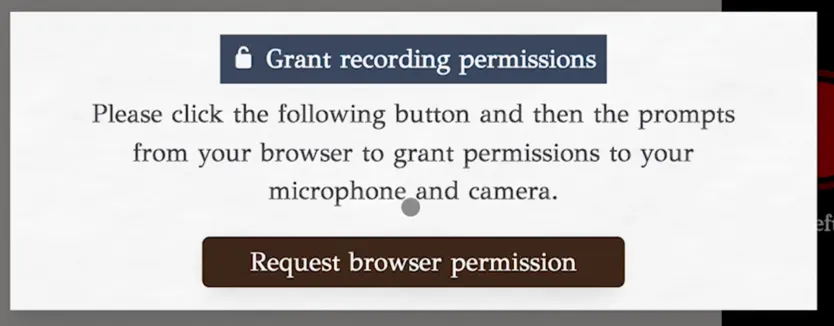
Thus the solution I went with was to add a button that we ask the user to click, which would then request permissions from the browser, instead of doing it on page load.
Concluding remarks
In summary, the reason the permissions pop-up didn’t work on Safari was because it was not preceded by a user interaction, e.g. a button click.
No wonder why many websites request permission like this instead of asking on page load, since it doesn’t work across all browsers. I always thought it was a bit annoying that I had to click two buttons to grant permissions instead of it automatically asking the browser on page load. It really demonstrates the wisdom in the old saying of how you should never remove a fence until you know why it was put up in the first place.